
Laptop Encoder Setup
Setup Diagram - Laptop Encoder
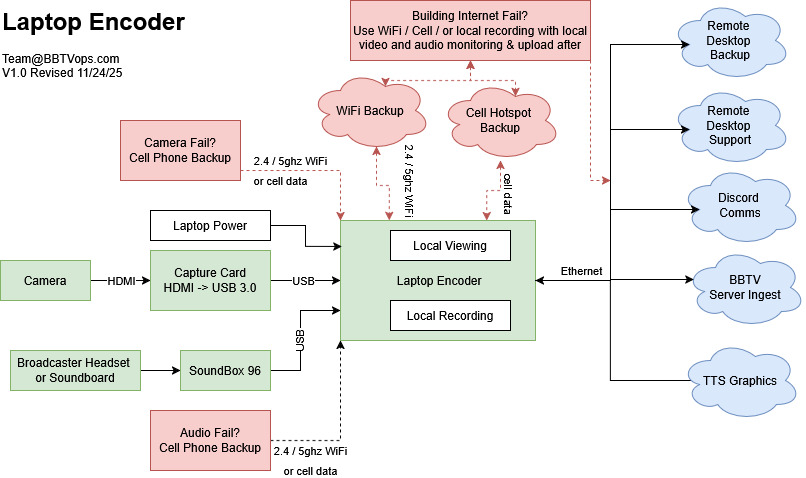
Game Day Checklist - Laptop Encoder
- Connect laptop to power
- Connect Cam Link to laptop USB
- Connect Sound Box to laptop USB
- Connect laptop to ethernet
- Power on laptop after phyiscal connections were made on USB
- Use login "Broadcaster" and password "BBTV"
- Connect HDMI of camera to Cam Link
- Connect XLR or 1/4" cable from mixer or microphone into Sound Box
- (Optional) If desirable, connect headphones to the "Phones" output on the back of the Sound Box
- Reach out by phone to bbtvops.com/soundcheck once the computer is booted for remote tech support to broadcast
Schedule Your Test
One test per season is recommended to ensure stability
Copyright 2025 | Black Bear TV | All Rights Reserved